Author: Michele Bologna

  • HP 6730b and fan at full speed after suspend (Fedora, Ubuntu, openSUSE)

    It seems that with kernels 3.9 onwards there are some issues with fan speed and the 6730b model of HP notebook. I tried with Fedora 22 (my main distribution of choice), openSUSE Tumbleweed and Ubuntu 15.04.

    The problem occurs only when the system is woken up after a sleep/suspend: fans spin at full speed indefinitely, without resort (apart from reboot/shutdown). This is a problem with ACPI. In order to solve this problem, if you’re using Fedora like me, create the file /etc/pm/sleep.d/99fancontrol.sh and fill it with the following:

    case "$1" in
    hibernate|suspend)
    # Stopping is not required.
    ;;
    thaw|resume)
    # In background.
    ls /sys/devices/virtual/thermal/cooling_device*/cur_state | while read A; do echo 1 > $A; echo 0 > $A; done
    ;;
    *) exit $NA
    ;;
    esac

    and of, course, set it executable with chmod +x.

    It basically flips on and off the current state of the cooling devices: with this script you won’t have the noisy fans at full speed on resume.

  • Spotify puzzles: round one

    Some time ago I came across Spotify puzzles, a website in which Spotify’s engineers list a series of CS problems and gather solutions from interested people.

    The interesting idea is that all solutions should be sent via mail, and an honorable (automated) judge tests the solution and sends the feedback.

    It would be fun to test how can you break the judge, but that will be another post. Let’s start with solving the first problem, in order of difficulty:

    Your task will be to write a program for reversing numbers in binary. For instance, the binary representation of 13 is 1101, and reversing it gives 1011, which corresponds to number 11.

    Easy peasy huh?

    First step: choosing a programming language to solve this problem: Ruby (“Your source code can be in C, C++, Java or Python (version 2.6)”). Python. First of all, I’ll take this opportunity to download and setup PyCharm, as the Python community seems to agree about it as the most versatile Python IDE.

    Second task: coding! Even if the request is to make it compatible to Python2.6, I’ll try to make my code Python3-compatible (always looking forward!). PyCharm is based on Java (note: on OSX Yosemite you must install a JVM, Apple is not shipping a JVM by default as in the past) and it’s heavily inspired by IntelliJ IDEA and Eclipse (IMHO). PyCharm guarantees a pleasant experience, trying to suggest me some optimizations while I write the code; refactoring-aside, PyCharm has a complete set of solutions to solve my refactoring problems.

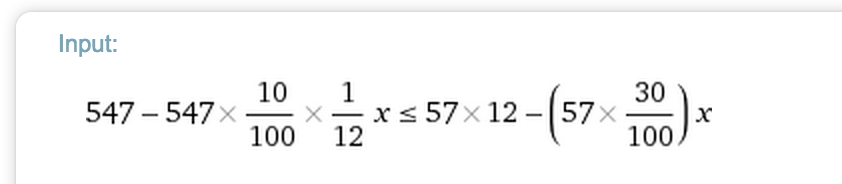
    About the code: the process of converting between binary and decimal is straightforward, and we must be careful about the corner case checking (and throwing an exception). pycharm

    Final step: testing! I always have been using Nose for my Python tests needing, but I wanted to get a glimpse of py.test. py.test is easy, streamlined and fast. It supports assert, among the others, for exception, and the syntax is clear and direct.py.test

    On top of all, git manages my changes. All the code is available on my GitHub profile (spotify_puzzles repo). Stay tuned for the next puzzles!

  • PSA: future posts will be in English (with some exceptions)

    It’s almost 7 years from my first post on this WordPress site. That’s a really, really lot of time.

    Today, I am announcing that future posts on this site will be written in English for one, main, big reason: I want to share my thoughts to a wider audience.

    Italian is my mother tongue but I feel confident enough to write in English (especially posts related to software, development and tech in general). As you may know, my knowledge of English is pretty much solid (I dare to say it after an abroad experience too!).

    So, my fellow readers, don’t be be alarmed: I will continue to personally write the posts that will appear here. And don’t be shy: I’m sure that most of you are tech-savvy enough (and English-savvy, moreover) to be participant as usually.

    Not all content will be in English: local and/or some particular content will be in Italian (more on that later). Don’t worry: all published content will remain and will remain untouched, of course in Italian language.

    Stay tuned, as it won’t be the only change!

  • Trenord/Trenitalia: è più conveniente un abbonamento mensile o annuale?

    Gennaio, tempi di rinnovi abbonamenti: nel mio caso, devo scegliere se pagare il (dis)servizio fornito da Trenord/Trenitalia.
    Mi è venuto un dubbio:

    È più conveniente acquistare 11/12 abbonamenti mensile o un abbonamento annuale, tenendo conto dei bonus?

    Se non sai cos’è un bonus: è una riduzione sul prezzo dell’abbonamento in base al rispetto dei tempi calcolato sul mese precedente.

    Ora passiamo ai calcoli.

    Alla pagina relativa alle tariffe di Trenord, segnati, per la tua fascia km, quanto costa un abbonamento mensile e quanto un abbonamento annuale.

    Screen Shot 2015-01-10 at 4.14.30 PM

    Per esempio, per un abbonamento di fascia km 28, segnati 57€ e 547€.

    Per quanto riguarda i bonus mensili, la riduzione è pari al 30% del prezzo dell’abbonamento. Per quanto riguarda l’abbonamento annuale, il bonus è “pari ad 1/12 del 10% del prezzo dell’abbonamento per ciascun mese in cui la soglia è stata superata sulla direttrice utilizzata, fino ad un valore massimo annuo del 10% del prezzo dell’abbonamento“.

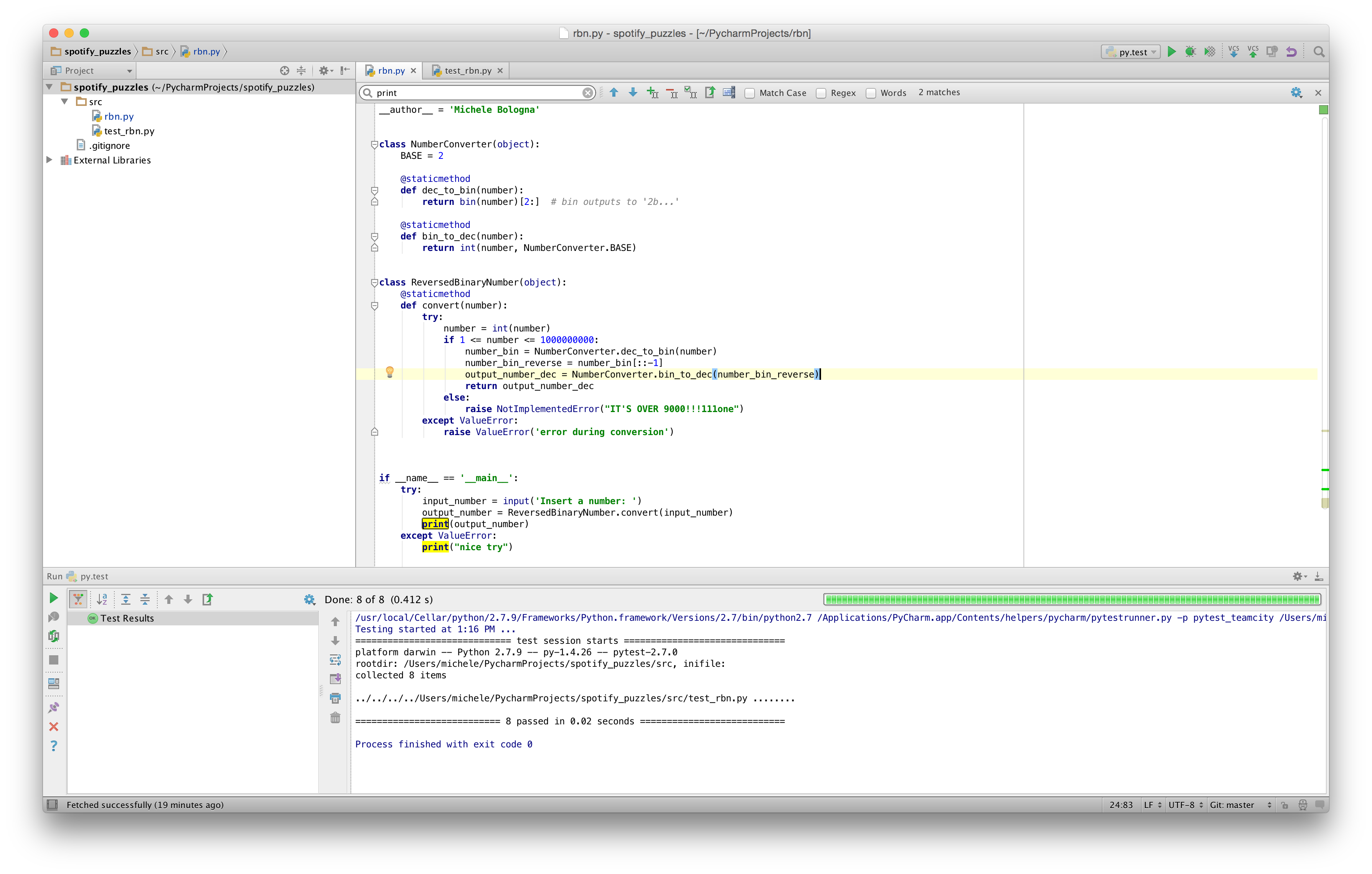
    Ora si tratta di tradurre il tutto in termini matematici e impostare la disequazione per conoscere quale delle due soluzioni sia più conveniente:

    < costo abbonamento annuale > - < costo abbonamento annuale > * 10/100 * 1/12 * x ≤ <costo abbonamento mensile> * 12 - (<costo abbonamento mensile> * 30/100) * x

    (dove con x indichiamo il numero di mesi percui l’abbonamento è ridotto grazie al bonus).

    Usando WolframAlpha per risolvere la disequazione del caso considerato:

    Screen Shot 2015-01-10 at 4.21.52 PM

    Otteniamo il risultato:

    Screen Shot 2015-01-10 at 4.22.57 PM

    che significa: se il numero di mesi in cui il bonus è presente è minore o uguale a 10, allora l’abbonamento annuale è più conveniente. Viceversa, è più conveniente il mensile. Attenzione: il valore risultante dipende dai prezzi annotati all’inizio, percui ripetete il calcolo per il vostro caso.

    Ora, armandoci di pazienza, verifichiamo nell’archivio dei bonus quante volte in un anno si è verificata la presenza del bonus per la tratta di riferimento. Nel caso considerato, per la linea direttrice, 6 “eventi” bonus nel corso dell’anno 2012, 3 “eventi” nel corso del 2011, e 1 “evento” nel 2010.

    6 eventi sono minore o uguale a 10, e di conseguenza per il caso considerato conviene l’acquisto di un abbonamento annuale. Non dimenticatevi di richiedere il bonus a scadenza abbonamento usando questo modulo.

    Ripetete i calcoli per il vostro caso e fate attenzione!

    [tutti i link verso Trenord presenti su questo sito sono in nofollow, ovviamente].
  • Chocolatey: apt-get per Windows

    Quando faccio il setup di una macchina con sistema operativo Windows, sento la mancanza di apt-get (per chi mastica Debian/Ubuntu) o yum (Red Hat/Fedora) per installare rapidamente programmi in una semplice istruzione.

    Esistono per Windows alcune alternative per implementare apt-get, ma la più valida è senza dubbio Chocolatey. Due punti di forza che mi sono subito saltati all’occhio: è molto estensibile ed è configurabile tramite Puppet.

    L’installazione è molto semplice: è sufficiente copiare/incollare la stringa contenuta sul sito in un prompt dei comandi ed è fatto.

    I pacchetti disponibili sono molto numerosi. Solitamente installo:

    choco install git googlechrome 7zip.install vlc nodejs.install ruby python putty sublimetext3

    e sono pronto.
    Da tenere nella cassetta degli attrezzi per quando si usa Windows!

  • Come usare Google Maps in modalità offline

    Ultimamente mi è capitato di utilizzare Google Maps (mobile) all’estero, dove non avevo a disposizione la connessione dati; esistono applicazioni che si appoggiano a OpenStreetMap e scaricano la mappa intera del Paese in cui siete (come ad esempio Galileo), ma per usare Google Maps in offline c’è un piccolo accorgimento che potete usare.

    Visualizzate la mappa che volete salvare. Scrivete quindi, nella barra di ricerca, “OK Maps“. L’applicativo scaricherà l’area visibile e la renderà visualizzabile anche in modalità offline, permettendovi anche di fare zoom-in nell’area interessata (a differenza di quello che potreste fare con uno screenshot).

    Ricordatevi le parole magiche e di salvare la mappa prima, magari con una connessione Wi-Fi.

  • Ubuntu rcS – variabili per modificare il comportamento degli script di boot

    Quando mi trovo a dover fare il setup di un nuovo server, cambio sempre una variabile nel file /etc/default/rcS, ovvero:

    FSCKFIX=yes

    che significa che, in caso di problemi durante il mount dei filesystem al boot, il sistema tenta automaticamente di riparare il file-system, senza interrompere il processo di boot invocando la shell come avviene nel caso default (FCSFIX=no).

    Ubuntu Manpage: rcS – variables that affect the behavior of boot scripts.

  • Xubuntu/XFCE: come avviare una sessione in VNC

    Di recente ho dovuto avviare una sessione VNC su una macchina remota; la mia preferenza per un desktop environment “light” ma al tempo stesso completo è andata su XFCE (installato di default su Xubuntu).

    Per avviare una sessione VNC è necessario modificare il file posto nella vostra home, e più precisamente in ~/.vnc/xstartup. Il file deve essere strutturato come segue (nel mio caso ho dovuto inserire soltanto le ultime due righe):

    #!/bin/sh

    Uncomment the following two lines for normal desktop:

    #unset SESSION_MANAGER
    #exec /etc/X11/xinit/xinitrc
    [ -x /etc/vnc/xstartup ] && exec /etc/vnc/xstartup
    [ -r $HOME/.Xresources ] && xrdb $HOME/.Xresources
    xsetroot -solid grey
    vncconfig -iconic &
    x-terminal-emulator -geometry 80×24+10+10 -ls -title "$VNCDESKTOP Desktop" &
    x-window-manager &
    startxfce4 &
    exec /usr/bin/xfce4-session &

  • Clip: copiare nella clipboard (appunti) dal prompt dei comandi

    Insieme a robocopy (di cui parleremo più avanti), un altro comando molto interessante presente in Windows è sicuramente clip.
    Il comando è infatti utilissimo nel caso in cui si voglia copiare del contenuto testuale nella clipboard di sistema (appunti) dal prompt dei comandi, magari in aggiunta ad una pipe (si proprio come in UNIX/Linux) per redirigere l’output del comando

    Un esempio:
    ipconfig /all | clip
    copierà negli appunti l’output del comando lanciato.

    Gli usi del comando sono molteplici, e mi è tornato utile in diversi scenari (anziché selezionare con il mouse dentro la finestra del prompt, ho semplicemente lanciato il comando con il pipe).

    Per gli utenti OSX: si, clip è il corrispettivo di pbcopy.

  • Rec Room: una toolchain per lo sviluppo web creata da Mozilla

    Segnalo quest’interessante framework rilasciato da Mozilla, Rec Room, che contiene una toolchain per lo sviluppo di applicazioni web.

    Non è qualcosa di nuovo: contiene tutte le liberie opensource più diffuse come Handlebar, Ember.js and Stylus [per citarne alcune].

    L’installazione è molto semplice, via npm (npm install -g recroom).

    Dateci un’occhiata: la prossima web-application che realizzerò userò sicuramente Rec Room!