Category: python

  • Spotify puzzles: round two

    Some months ago, I began challenging myself with Spotify puzzles: at that time I was dealing with an easy problem; now, the difficulty has increased. The round two consists in the typical “Selection problem“: given an array of values, find the max (or min) k values. I decided to still use Python and to use its heapq module to store values in a binary max-heap data structure, and then remove exactly k values from the top of the heap. This approach will guarantee that the total time complexity of the algorithm will be O(n log k).

    The heapq module implements a min-heap data structure (as happens in Java). In order to use a max-heap, I specified a custom comparator for the Song class I wrote (remember: Python3 deprecates __cmp__ method, so I resort to implement __lt__ and __eq__ methods to specify a custom comparison algorithm):

    # If two songs have the same quality, give precedence to the one
    # appearing first on the album (presumably there was a reason for the
    # producers to put that song before the other).
    def __lt__(self, other):
        if self.quality == other.quality:
            return self.index < other.index
        else:
            # heapq is a min-heap, so a song is lt than another if it has
            # a greater quality (inverted!)
            return self.quality > other.quality
    
    def __eq__(self, other):
        return self.quality == other.quality and \
               self.index == other.index
    

    As always, I used py.test to automatically test my solution against test-cases.

    pytest

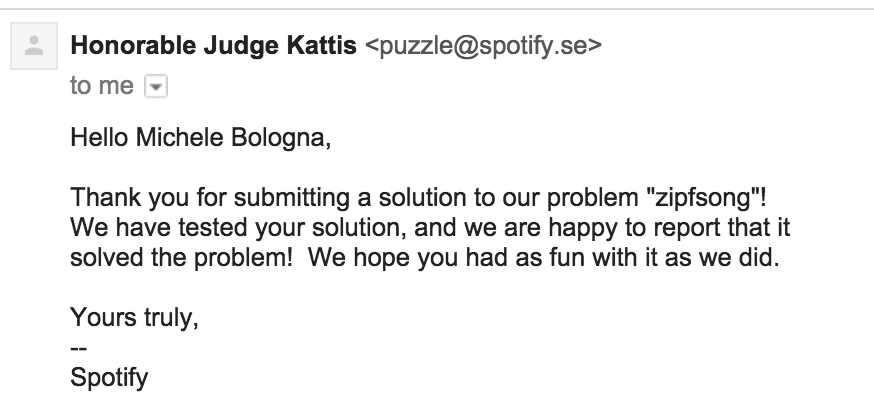
    In the end, the honorable (automated) judge confirms the solution:

    spotify_zipfsong

    Code has been published on GitHub.

  • Fun with Python powered telnetd honeypot

    Reason: hardening, serendipity and curiosity

    As you already know, in the past weeks I hardened all of my boxes: while doing it, I flushed all iptables/ipfw rules, changed the default policy to DROP and take it from there to enable every rule as soon as I need it. Whilst Ubuntu uses ufw as a fronted for iptables, Fedora uses firewalld.

    After setting up UFW, by looking at journalctl I can see all rejected connections, like:

    Sep 03 11:54:16 -- kernel: [UFW BLOCK] IN=eth0 OUT= MAC=XX SRC=XX DST=XX LEN=60 TOS=0x00 PREC=0x00 TTL=51 ID=24286 DF PROTO=TCP SPT=36864 DPT=23 WINDOW=5808 RES=0x00 SYN URGP=0
    

    As we all know, Internet is a wild place. In this particular case, someone was trying to connect to my box on port 23/tcp (telnetd, is still there someone who uses it?).

    My curiosity begin to increase. Let’s have a look on which ports I rejected most of the connections:

    /var/log # zgrep -ho "DPT=\w*" syslog* | cut -d "=" -f 2 | sort | uniq -c | sort -nr | head -n 10
        # no. of attempts | port
       1009 23
        969 3128
        330 22
        248 8080
        168 80
        158 5060
        151 3389
        111 1825
         94 1433
         77 123
    

    (as I am running an httpd-ssl server on this host, connections to 443/tcp port are not showed).

    Idea

    Ok, so mostly of the wild connectors out there try to telnetd to my host (and all other hosts on the Internet). Again, my curiosity prevails: how about a fake telnetd server written in Python with twisted? As I always wanted to have a look with twisted, seems a good idea. The main idea here is to write a simple telnetd server that:

    • shows the root prompt and waits for commands
    • answers with fake answers to some UNIX commands (like uname and id)
    • answers to all other commands with Command not found or with nothing (like that the command was accepted). The choice between answering in the former way rather than the latter is random
    • record everything that is written by the attacker

    This is a very simple and diminished concept of an Honeypot and leads to the code I published the code on GitHub under telnetd_honeypot.

    Just for the sake of increased security, I did not want to run this program as root (not because I do not trust it, just because it’s a bad practice!). But we need to run it as root, because we need superuser powers to open a listening socket on all ports <1024, especially 23/tcp.

    Sounds like a dead end? Not at all. Meet rinetd. We set up a bounce redirection from 23/tcp to the port on which our basic honeypot is listening (8023/tcp), launched by an unprivileged user (again: for security. Feel free to spin up a Docker container just to launch the honeypot).

    Demo

    % python telnetd.py &
    [1] 15171
    % telnet localhost 8023
    Trying 127.0.0.1...
    Connected to localhost.
    Escape character is '^]'.
    / # uname -a
    Linux f001 3.13.3-7-high-octane-fueled #3000-LPG SMPx4 Fri Jun 31 25:24:23 UTC 2200 x86_64 x64_86 x13_37 GNU/Linux
    / # id
    uid=0(root) gid=0(root) groups=0(root)
    / # ls
    / # ps auxw
    bash: ps: command not found

    Results

    The results are quite fascinating. By analizing our file produced by our honeypot runned just for 3 days we can see the most typed commands on the other side of the client:

    ~ % cut -d " " -f 6- telnetd_honeypot.log | sort | uniq -c | sort -nr | head -n 3  
    921 sh
    918 /bin/busybox ZORRO
    879 root
    

    We might notice that most of the lines are common passwords guessing, while the busybox invocation with the parameter ZORRO is mysterious: even Googling, I have no clues about it. Sounds like a custom firmware? There are also multiple attempt to inject a shellcode (which I am not publishing for obvious reasons).

    There are also funny entries:

    08/20/2015 12:43:10 AM INFO: 79.x.x.x knock knock neo
    

    Anyone else has seen Neo?

    The results are pretty interesting and deserve a further investigation. Upon running just for 3 days, I gather enough results to satisfy my curiosity. The honeypot described here is just a starting point, hoping to gather more contributors to this fascinating problem. With the addition of Docker containers, the future possibilities are quite infinite. Happy investigating!

  • Spotify puzzles: round one

    Some time ago I came across Spotify puzzles, a website in which Spotify’s engineers list a series of CS problems and gather solutions from interested people.

    The interesting idea is that all solutions should be sent via mail, and an honorable (automated) judge tests the solution and sends the feedback.

    It would be fun to test how can you break the judge, but that will be another post. Let’s start with solving the first problem, in order of difficulty:

    Your task will be to write a program for reversing numbers in binary. For instance, the binary representation of 13 is 1101, and reversing it gives 1011, which corresponds to number 11.

    Easy peasy huh?

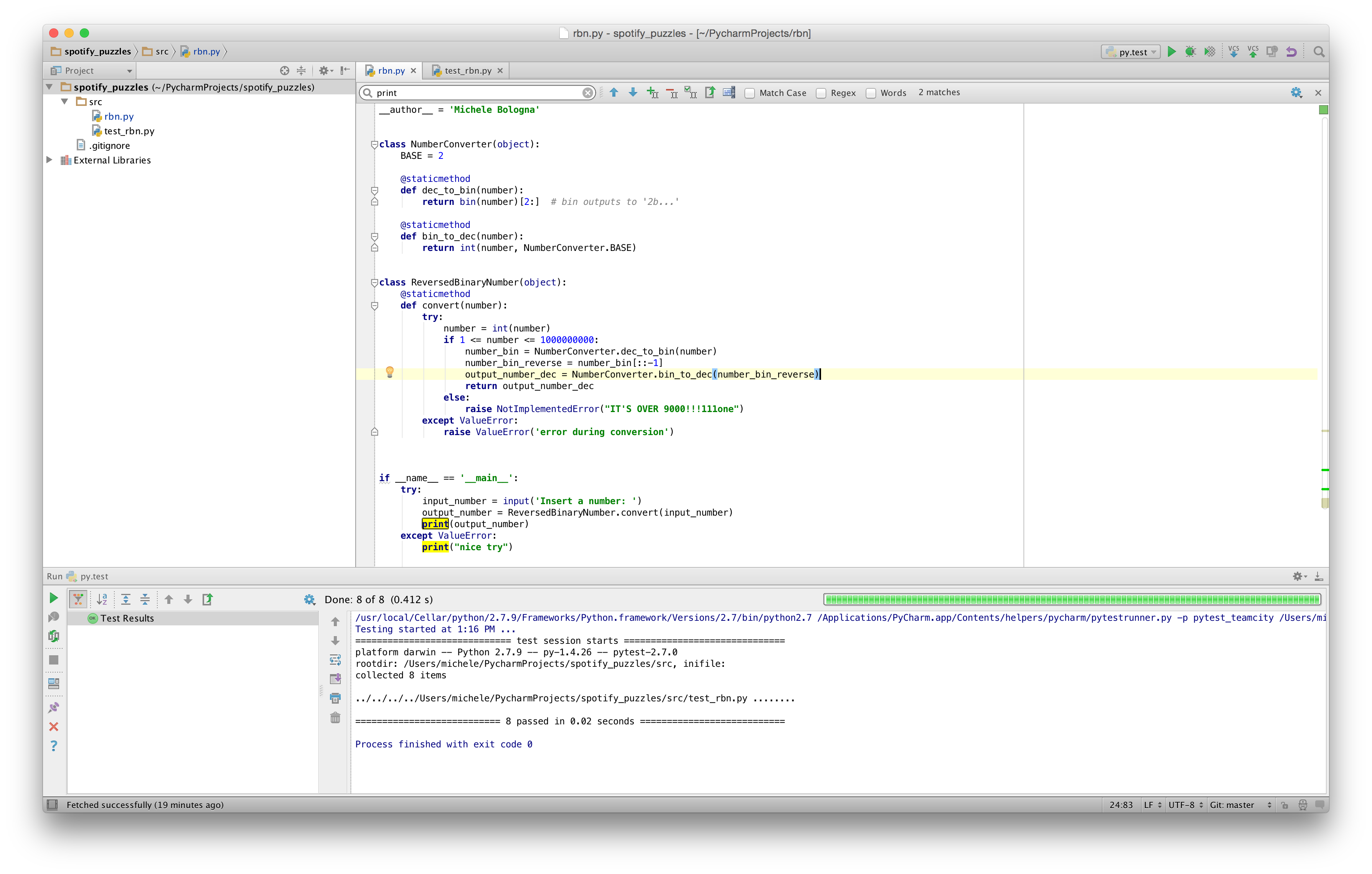
    First step: choosing a programming language to solve this problem: Ruby (“Your source code can be in C, C++, Java or Python (version 2.6)”). Python. First of all, I’ll take this opportunity to download and setup PyCharm, as the Python community seems to agree about it as the most versatile Python IDE.

    Second task: coding! Even if the request is to make it compatible to Python2.6, I’ll try to make my code Python3-compatible (always looking forward!). PyCharm is based on Java (note: on OSX Yosemite you must install a JVM, Apple is not shipping a JVM by default as in the past) and it’s heavily inspired by IntelliJ IDEA and Eclipse (IMHO). PyCharm guarantees a pleasant experience, trying to suggest me some optimizations while I write the code; refactoring-aside, PyCharm has a complete set of solutions to solve my refactoring problems.

    About the code: the process of converting between binary and decimal is straightforward, and we must be careful about the corner case checking (and throwing an exception). pycharm

    Final step: testing! I always have been using Nose for my Python tests needing, but I wanted to get a glimpse of py.test. py.test is easy, streamlined and fast. It supports assert, among the others, for exception, and the syntax is clear and direct.py.test

    On top of all, git manages my changes. All the code is available on my GitHub profile (spotify_puzzles repo). Stay tuned for the next puzzles!

  • Formattare i decimali con Python

    Un problema che ho recentemente risolto usando Python e la logica binaria prevedeva di stampare i numeri binari usando lo stesso numero di cifre [ad esempio: nel caso di 8 bit, stampare le parole di 4 bit anteponendo zero per quattro volte]. Tecnicamente, gli zero a sinistra sono ininfluenti ma servono per uniformare la formattazione, e in gergo sono chiamati leading zeros.
    Questo ragionamento non vale solo per i numeri in binario, ma per tutti i casi in cui si vuole formattare l’output di Python.

    Veniamo al codice. Si può formattare la stringa tramite format, specificando il numero di leading zeros.
    Esempio:

    for i in range(1,101,1):
        print(format(i, "03d"))


    In questo caso vengono stampati i numeri usando 3 cifre: si parte quindi da 000 e si arriva a 100. E in più, abbiamo usato una sintassi già compatibile con Python3.

  • Aggiornare tutti i package Python installati con pip

    Per aggiornare tutti i package Python installati, suggerisco di usare pip nel seguente modo:

    1. Aggiorno pip all’ultima versione (suppongo di avere easy_install): easy_install -U pip
    2. Estraggo la lista dei pkg installati e li aggiorno uno per uno: pip freeze --local | cut -d = -f 1 | xargs pip install -U
  • django: come fare il deploy di un’applicazione su Apache

    Una volta che avete terminato lo sviluppo di un’applicazione basata su django, è il momento di installarla in produzione. Nel mio caso, ho utilizzato django 1.3.1 e ho scelto di utilizzare Apache e mod_wsgi. Vediamo come fare il deploy passo-passo:

    • Fortunatamente mod_wsgi richiede Apache mpm-worker (anziché il meno performante prefork) che su Debian/Ubuntu è facilmente installabile tramite sudo apt-get install libapache2-mod-wsgi
    • Spostiamo l’applicazione sotto un path di sistema, tipo /usr/share/app
    • Aggiungere a /etc/httpd.conf la direttiva WSGIScriptAlias / /usr/share/app/django.wsgi dove il primo parametro (/) rappresenta il path a cui django dovrà rispondere (in questo caso la root), mentre il secondo parametro rappresenta un file che scriveremo nel prossimo step, e che descrive a WSGI come interpretare l’applicazione django che abbiamo scritto
    • Aprite il file che abbiamo definito al punto precedente (django.wsgi) e inserite il seguente codice Python:
      “`
      import os
      import sys
      import django.core.handlers.wsgipath = '/usr/share/app'
      if path not in sys.path:
      sys.path.append(path)

      os.environ['DJANGO_SETTINGS_MODULE'] = 'app.settings'

      application = django.core.handlers.wsgi.WSGIHandler()
      “`

      Ricordatevi di settare correttamente il path e i settings (che corrisponde al settings.py di django)

    • Riavviare apache: service apache2 restart

    Aprite il browser andando a settare l’URL in corrispondenza di quanto definito al punto 1 di questo tutorial (il context-path) e controllate che sia tutto a posto (diversamente, controllate l’error log di Apache).
    Una soluzione aggiuntiva sarebbe quella di introdurre un reverse proxy (scelta personale: nginx) davanti ad Apache per servire i files statici (js, css, png, etc.). Ma questo sarà un altro post.

  • Sviluppare applicazioni web con Django: la mia recensione

    Spinto dalla curiosità, mi sono deciso ad imparare il framework Django, basato su Python, per sviluppare applicazioni web. In particolare, mi sono procurato il libro di Marco Beri “Sviluppare applicazioni web con Django”, edito da Apogeo. Comincio subito col dire che il prezzo è decisamente alto (32 Euro), nonostante il libro sia del 2009.

    Il libro svolge un ottimo ruolo introduttivo alle caratteristiche di Django, presentando i concetti fondamentali, tra cui:

    • ORM integrato
    • i modelli
    • i form
    • i template

    Il tutto viene presentato con semplici esempi con cui è possibile capire come il framework può essere sfruttato per sviluppare velocemente un’applicazione web.

    Seppure ben scritto, non rappresenta un sostitutivo alla documentazione ufficiale di Django: per sviluppare efficientemente un’applicazione web ho letto l’ampia ed estesa documentazione (in inglese) che mi ha aiutato a capire meglio come sviluppare meglio l’applicazione facendomi aiutare dal framework; ovviamente non è un demerito del libro, proprio perché il libro è del 2009, mentre la documentazione è aggiornata all’ultima release (attualmente la versione 1.3.1 è marcata come production-ready).

    In definitiva: se vi serve un’infarinatura su Django, comprate il libro. Altrimenti, consultate la documentazione online.

  • Python: scriviamo un generatore di Fibonacci ricorsivo (e poi iterativo) ed analizziamone la complessità asintotica

    Tralasciando la parte matematica su cui potete trovare un’esauriente (ed interessante) spiegazione su Wikipedia, la serie di Fibonacci si definisce:

    F(n) = F(n-1) + F(n-2)

    per n > 1, e F(1) = 1 e F(0) = 0

    Scriviamo un generatore di questa serie in Python:

    #!/usr/bin/python
    
    # fib(n) = fib(n-1)+fib(n-2)
    # fib(0) = 0
    # fib(1) = 1
    # fib(2) = 1
    # fib(3) = 2
    # fib(4) = 3
    # fib(5) = 5
    # fib(6) = 8
    # ...
    
    def fib(n):
        if n == 0:
            return 0;
        if n == 1:
            return 1;
        else:
            return fib(n-1) + fib(n-2)
    

    Abbiamo utilizzato un’implementazione ricorsiva; il vero problema di quest’implementazione è subito chiaro: la complessità O(n^2) data dalla ricorsione e dalle tail-call sullo stack (per n molto grande).
    Decidiamo allora di scriverne una versione equivalente ma iterativa, in modo da eliminare il problema della complessità:

    def fibnr(n):
        fn1 = 1;
        fn2 = 0;
        fib = 0;
        i = 2;
        if n == 0:
             return 0;
        if n == 1:
             return 1;
    
        while (i <= n):
            fib = fn1 + fn2
            tmp = fn1
            fn1 = fib
            fn2 = tmp
            i += 1
        return fib
    

    La vera complessità questa volta, sta nella testa del programmatore: è molto importante, infatti, scrivere nel modo più preciso possibile il corpo del while. Inoltre, è necessario implementare uno swap di variabile per tenere traccia della storicità della serie (per semplicità qui non ho usato lo swap di due variabili senza una variabile temporanea che ho presentato nei post precedenti). La complessità di questa soluzione iterativa è O(n).

    Implementando una sorta di controllo automatico (tramite assert), possiamo capire che la soluzione iterativa è equivalente alla soluzione ricorsiva, ma sappiamo anche che è più veloce e lineare (grazie all’analisi asintotica che abbiamo realizzato):

    #!/usr/bin/python
    
    # fib(n) = fib(n-1)+fib(n-2)
    # fib(0) = 0
    # fib(1) = 1
    # fib(2) = 1
    # fib(3) = 2
    # fib(4) = 3
    # fib(5) = 5
    # fib(6) = 8
    # ...
    
    def fib(n):
        if n == 0:
            return 0;
        if n == 1:
            return 1;
        else:
            return fib(n-1) + fib(n-2)
    
    def fibnr(n):
        fn1 = 1;
        fn2 = 0;
        fib = 0;
        i = 2;
        if n == 0:
             return 0;
        if n == 1:
             return 1;
    
        while (i <= n):
            fib = fn1 + fn2
            tmp = fn1
            fn1 = fib
            fn2 = tmp
            i += 1
        return fib
    
    if __name__ == '__main__':
        for i in xrange(21):
            print i, ',', fib(i), '|', fibnr(i)
            assert (fib(i) == fibnr(i))
    
  • Python: scriviamo un HTTPS downloader simile a wget (con urllib2, optparse e getpass)

    Per ragioni di semplicità di utilizzo e immediatezza (e anche per imparare qualcosa di nuovo), la settimana scorsa ho dovuto scrivere un downloader da linea di comando simile a GNU wget, ma con alcuni requisiti personalizzati:

    • l’accesso alla pagina di download è protetto da userid e password (autenticazione HTTPDigestAuth);
    • il protocollo di accesso è HTTPS;
    • una volta ottenuto l’accesso, è necessario fare il GET di alcuni files ben particolari e crearli su hard disk.

    Per realizzare questo wget-like in Python, usiamo il modulo urllib2 che ci permette di accedere a risorse esterne tramite i protocolli più svariati. Per aprire una connessione HTTPS e autenticarci correttamente usiamo i seguenti statement:

        passman.add_password(None, url, username, password)
        authhandler = urllib2.HTTPDigestAuthHandler(passman)
        opener = urllib2.build_opener(authhandler)
    

    Affinché la gestione delle varie opzioni sia più semplice possibile, usiamo anche il modulo optparse (che permette di passare le opzioni al programma in modo simile alle utility GNU):

    parser = optparse.OptionParser()
    parser.add_option("-u", "–username")
    parser.add_option("-d", "–date")
    parser.add_option("-t", "–target", default="logs")
    options, arguments = parser.parse_args()
    

    Visto che dovremo gestire anche l’autenticazione tramite username e password, la scelta di passare la password come argomento del programma è una scelta non ottimale: una semplice ricerca nella history della shell utilizzata potrebbe permettere ad un attaccante di risalire alla password. Per questo ci viene incontro il pacchetto getpass che, in modo simile ai programmi UNIX che si rispettino, chiede interattivamente la password (senza stamparla, ovviamente!). Per richiedere l’inserimento della password all’utente è sufficiente:

    password = getpass.getpass()
    

    Torniamo ora all’inizio: abbiamo ottenuto dall’utente username (passato come argomento) e password (richiesta interattivamente): ora possiamo aprire una connessione verso l’hostname di riferimento e richiedere il download del file (salvando su file lo stream del file in ricezione tramite i metodi standard di Python):

    passman = urllib2.HTTPPasswordMgrWithDefaultRealm()
    passman.add_password(None, url, options.username, password)
    authhandler = urllib2.HTTPDigestAuthHandler(passman)
    opener = urllib2.build_opener(authhandler)
    download = opener.open(file)
    logging.debug('downloading %s ...' % file)
    fo = open(options.target + os.sep + targetFileName, 'w')
    fo.write(download.read())
    fo.close()
    

    Abbiamo quindi ottenuto un semplice downloader di file scritto in Python, molto più semplice di wget ma al tempo stesso molto più customizzabile.

  • Scambiare il contenuto di due variabili int senza utilizzare una variabile temporanea: XOR swap

    Una domanda interessante che mi è stata posta è: “com’è possibile scambiare il contenuto di due variabili senza utilizzare una variabile temporanea?”.

    Infatti, per scambiare il contenuto di due variabili, di solito si utilizza una variabile temporanea (vediamo un esempio in Python):

    a = 13
    b = 17
    c = a
    a = b
    b = c
    >>> a
    17
    >>> b
    13
    

    Ora, per scambiare due variabili senza una variabile temporanea (nel nostro caso l’abbiamo chiamata ‘c’), ho pensato di utilizzare un procedimento di questo tipo:

    a = 13
    b = 17
    a = a+b
    b = a-b
    a = a-b
    >>> a
    17
    >>> b
    13
    

    La soluzione a cui sono arrivato viene classificata come una variante del più diffuso XOR swap algorithm, che, in forma più generale, permette di scambiare due variabili semplicemente usando l’operazione di XOR:

    a = 13
    b = 17
    a = a ^ b
    b = a ^ b
    a = a ^ b
    >>> a
    17
    >>> b
    13
    

    Lo XOR swap può essere utile in casi molto particolari, come ad esempio quando la memoria disponibile è notevolmente limitata.
    Bonus point: in Python non c’è bisogno di utilizzare l’algoritmo di XOR swap:

    a = 13
    b = 17
    a, b = b, a
    >>> a
    17
    >>> b
    13
    

    E c’è di più: questo “trucco” funziona anche per i tipi di dato non intero!

    a = 'homer'
    b = 'marge'
    a, b = b, a
    >>> a
    'marge'
    >>> b
    'homer'