Category: programming

  • git: deleting remote tracked branches

    Since I’m always DuckDuckGo-ing for these information, I’ll set a note here for future reference and for all of you, fellow readers.

    Situation: one (or more) remote-tracked git branches got deleted (either locally or remote). You are in either one of the two cases following:

    • you have deleted the local branch and you want to delete that branch in the remote too. What you want is:

    git push <remote> :<deleted_branch>

    • someone (you or other allowed members on the remote) has deleted a remote branch. To delete all stale remote-tracked branches for a given remote:

    git remote prune <remote>

  • git tip: multiple identities

    If you are using git version control for personal and work repositories, it is tricky to change your email address (in ~/.gitconfig) to properly use the correct email before committing to a repo (this is what I do, depending on the nature of the repo: personal repo -> personal email, work repo -> work email).

    Before this post, I was using some articulated methods to change my email address depending on the repo, but none of these methods was really portable (or officially documented).

    Starting from version 2.8.0, you can use “multiple identities” when committing; to achieve this, you must remove your personal details from the config with:

    git config --global --unset-all user.name

    git config --global --unset-all user.email

    and set a new option:

    git config --global user.useConfigOnly true

    Now, everytime you try to commit, git complains to instruct it with your personal details:

    % git commit
    
    *** Please tell me who you are.
    
    Run
    
    git config --global user.email "you@example.com" git config --global user.name "Your Name"
    
    to set your account's default identity. Omit --global to set the identity only in this repository.
    
    fatal: no name was given and auto-detection is disabled
    

    The only drawback of this approach is that you have to set these details on every repository. Do you know any better ideas?

  • ZeroTurnaround’s Java Tools and Technologies Landscape Report 2016

    As of every year, ZeroTurnaround released the yearly report of their survey about Java and Java-related technologies among professional developers. I find this report very interesting, and I usually compare (or discover) existing technology solutions.

    For example, right now I’m currently thinking about moving to Intellij IDEA.

    How do you measure up against the report?

  • Spotify puzzles: round two

    Some months ago, I began challenging myself with Spotify puzzles: at that time I was dealing with an easy problem; now, the difficulty has increased. The round two consists in the typical “Selection problem“: given an array of values, find the max (or min) k values. I decided to still use Python and to use its heapq module to store values in a binary max-heap data structure, and then remove exactly k values from the top of the heap. This approach will guarantee that the total time complexity of the algorithm will be O(n log k).

    The heapq module implements a min-heap data structure (as happens in Java). In order to use a max-heap, I specified a custom comparator for the Song class I wrote (remember: Python3 deprecates __cmp__ method, so I resort to implement __lt__ and __eq__ methods to specify a custom comparison algorithm):

    # If two songs have the same quality, give precedence to the one
    # appearing first on the album (presumably there was a reason for the
    # producers to put that song before the other).
    def __lt__(self, other):
        if self.quality == other.quality:
            return self.index < other.index
        else:
            # heapq is a min-heap, so a song is lt than another if it has
            # a greater quality (inverted!)
            return self.quality > other.quality
    
    def __eq__(self, other):
        return self.quality == other.quality and \
               self.index == other.index
    

    As always, I used py.test to automatically test my solution against test-cases.

    pytest

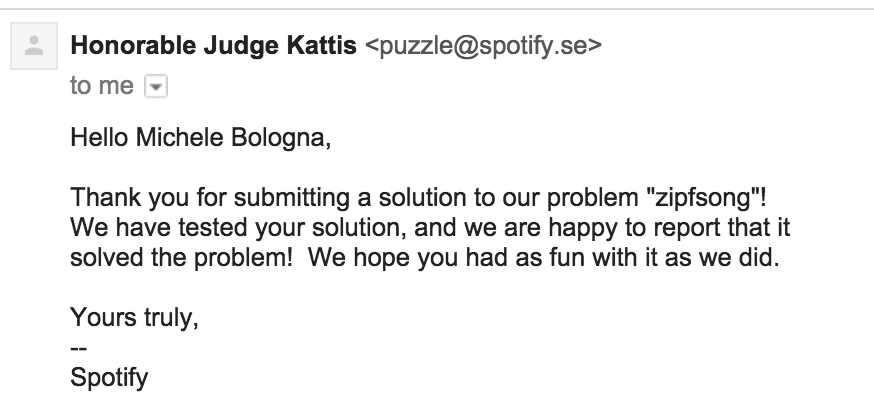
    In the end, the honorable (automated) judge confirms the solution:

    spotify_zipfsong

    Code has been published on GitHub.

  • Fun with Python powered telnetd honeypot

    Reason: hardening, serendipity and curiosity

    As you already know, in the past weeks I hardened all of my boxes: while doing it, I flushed all iptables/ipfw rules, changed the default policy to DROP and take it from there to enable every rule as soon as I need it. Whilst Ubuntu uses ufw as a fronted for iptables, Fedora uses firewalld.

    After setting up UFW, by looking at journalctl I can see all rejected connections, like:

    Sep 03 11:54:16 -- kernel: [UFW BLOCK] IN=eth0 OUT= MAC=XX SRC=XX DST=XX LEN=60 TOS=0x00 PREC=0x00 TTL=51 ID=24286 DF PROTO=TCP SPT=36864 DPT=23 WINDOW=5808 RES=0x00 SYN URGP=0
    

    As we all know, Internet is a wild place. In this particular case, someone was trying to connect to my box on port 23/tcp (telnetd, is still there someone who uses it?).

    My curiosity begin to increase. Let’s have a look on which ports I rejected most of the connections:

    /var/log # zgrep -ho "DPT=\w*" syslog* | cut -d "=" -f 2 | sort | uniq -c | sort -nr | head -n 10
        # no. of attempts | port
       1009 23
        969 3128
        330 22
        248 8080
        168 80
        158 5060
        151 3389
        111 1825
         94 1433
         77 123
    

    (as I am running an httpd-ssl server on this host, connections to 443/tcp port are not showed).

    Idea

    Ok, so mostly of the wild connectors out there try to telnetd to my host (and all other hosts on the Internet). Again, my curiosity prevails: how about a fake telnetd server written in Python with twisted? As I always wanted to have a look with twisted, seems a good idea. The main idea here is to write a simple telnetd server that:

    • shows the root prompt and waits for commands
    • answers with fake answers to some UNIX commands (like uname and id)
    • answers to all other commands with Command not found or with nothing (like that the command was accepted). The choice between answering in the former way rather than the latter is random
    • record everything that is written by the attacker

    This is a very simple and diminished concept of an Honeypot and leads to the code I published the code on GitHub under telnetd_honeypot.

    Just for the sake of increased security, I did not want to run this program as root (not because I do not trust it, just because it’s a bad practice!). But we need to run it as root, because we need superuser powers to open a listening socket on all ports <1024, especially 23/tcp.

    Sounds like a dead end? Not at all. Meet rinetd. We set up a bounce redirection from 23/tcp to the port on which our basic honeypot is listening (8023/tcp), launched by an unprivileged user (again: for security. Feel free to spin up a Docker container just to launch the honeypot).

    Demo

    % python telnetd.py &
    [1] 15171
    % telnet localhost 8023
    Trying 127.0.0.1...
    Connected to localhost.
    Escape character is '^]'.
    / # uname -a
    Linux f001 3.13.3-7-high-octane-fueled #3000-LPG SMPx4 Fri Jun 31 25:24:23 UTC 2200 x86_64 x64_86 x13_37 GNU/Linux
    / # id
    uid=0(root) gid=0(root) groups=0(root)
    / # ls
    / # ps auxw
    bash: ps: command not found

    Results

    The results are quite fascinating. By analizing our file produced by our honeypot runned just for 3 days we can see the most typed commands on the other side of the client:

    ~ % cut -d " " -f 6- telnetd_honeypot.log | sort | uniq -c | sort -nr | head -n 3  
    921 sh
    918 /bin/busybox ZORRO
    879 root
    

    We might notice that most of the lines are common passwords guessing, while the busybox invocation with the parameter ZORRO is mysterious: even Googling, I have no clues about it. Sounds like a custom firmware? There are also multiple attempt to inject a shellcode (which I am not publishing for obvious reasons).

    There are also funny entries:

    08/20/2015 12:43:10 AM INFO: 79.x.x.x knock knock neo
    

    Anyone else has seen Neo?

    The results are pretty interesting and deserve a further investigation. Upon running just for 3 days, I gather enough results to satisfy my curiosity. The honeypot described here is just a starting point, hoping to gather more contributors to this fascinating problem. With the addition of Docker containers, the future possibilities are quite infinite. Happy investigating!

  • Spotify puzzles: round one

    Some time ago I came across Spotify puzzles, a website in which Spotify’s engineers list a series of CS problems and gather solutions from interested people.

    The interesting idea is that all solutions should be sent via mail, and an honorable (automated) judge tests the solution and sends the feedback.

    It would be fun to test how can you break the judge, but that will be another post. Let’s start with solving the first problem, in order of difficulty:

    Your task will be to write a program for reversing numbers in binary. For instance, the binary representation of 13 is 1101, and reversing it gives 1011, which corresponds to number 11.

    Easy peasy huh?

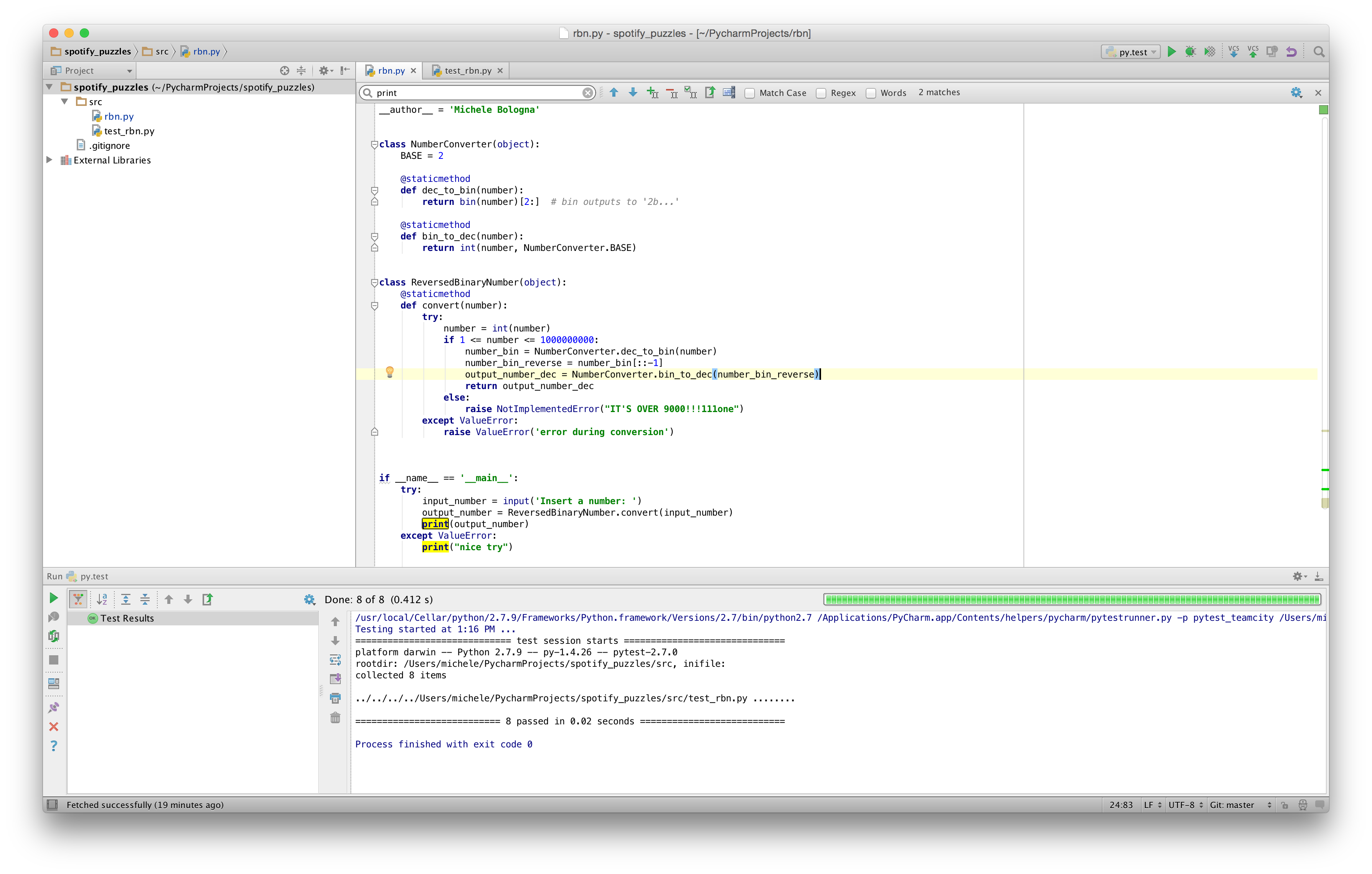
    First step: choosing a programming language to solve this problem: Ruby (“Your source code can be in C, C++, Java or Python (version 2.6)”). Python. First of all, I’ll take this opportunity to download and setup PyCharm, as the Python community seems to agree about it as the most versatile Python IDE.

    Second task: coding! Even if the request is to make it compatible to Python2.6, I’ll try to make my code Python3-compatible (always looking forward!). PyCharm is based on Java (note: on OSX Yosemite you must install a JVM, Apple is not shipping a JVM by default as in the past) and it’s heavily inspired by IntelliJ IDEA and Eclipse (IMHO). PyCharm guarantees a pleasant experience, trying to suggest me some optimizations while I write the code; refactoring-aside, PyCharm has a complete set of solutions to solve my refactoring problems.

    About the code: the process of converting between binary and decimal is straightforward, and we must be careful about the corner case checking (and throwing an exception). pycharm

    Final step: testing! I always have been using Nose for my Python tests needing, but I wanted to get a glimpse of py.test. py.test is easy, streamlined and fast. It supports assert, among the others, for exception, and the syntax is clear and direct.py.test

    On top of all, git manages my changes. All the code is available on my GitHub profile (spotify_puzzles repo). Stay tuned for the next puzzles!

  • Chocolatey: apt-get per Windows

    Quando faccio il setup di una macchina con sistema operativo Windows, sento la mancanza di apt-get (per chi mastica Debian/Ubuntu) o yum (Red Hat/Fedora) per installare rapidamente programmi in una semplice istruzione.

    Esistono per Windows alcune alternative per implementare apt-get, ma la più valida è senza dubbio Chocolatey. Due punti di forza che mi sono subito saltati all’occhio: è molto estensibile ed è configurabile tramite Puppet.

    L’installazione è molto semplice: è sufficiente copiare/incollare la stringa contenuta sul sito in un prompt dei comandi ed è fatto.

    I pacchetti disponibili sono molto numerosi. Solitamente installo:

    choco install git googlechrome 7zip.install vlc nodejs.install ruby python putty sublimetext3

    e sono pronto.
    Da tenere nella cassetta degli attrezzi per quando si usa Windows!

  • Gli showcases di GitHub: un link da bookmarkare!

    Oggi ho trovato un link molto interessante su GitHub: gli showcases.

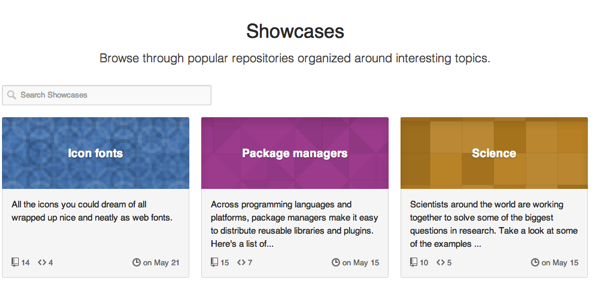
    Github showcasesSi tratta di una pagina ospitata dal famoso sito di social coding che permette di conoscere ed esplorare alcuni progetti software opensource e – perché no – prendere spunti di organizzazione e metodologie di un progetto.
    I progetti sono catalogati per topic per una più facile consultazione, ed è molto ben fatto ed organizzato.

    Ad esempio, grazie a questa pagina ho scoperto Rubocop, un linter per Ruby che si è rivelato molto utile in più di una occasione.
    Ho inserito il link nel mio toolbox per lo sviluppo software, sicuramente sarà utile in futuro per trovare qualche progetto/tool che mi aiuterà nello sviluppo software.

  • git-flow: il modello di git workflow che utilizzo

    Dopo aver letto l’interessante presentazione “How GitHub uses GitHub to build GitHub“, ho deciso di dare un’occhiata al modello di workflow chiamato git-flow [che si basa, ovviamente, sull’utilizzo di git].
    In sintesi:

    • Ci sono due branch sempre presenti: master e develop:
      • master contiene tutti i commit per cui il repo è deployabile in produzione [production ready].
      • develop contiene il codice di integrazione. Va da sé che una volta che il codice di integrazione è pronto, viene fatto un merge verso master.
    • Ci sono alcuni branch che vengono creati/distrutti all’occorrenza: feature, release e hotfix:
      • feature è un branch di develop che contiene, appunto, alcune features“locali” al brach di sviluppo di cui verrà fatto il merge verso develop
      • release: una volta che il branch develop ha abbastanza features per una release, si crea un branch di develop per prepararsi ad un ciclo di rilascio. Nessuna nuova feature può essere introdotta a partire da questo branch. Una volta pronto, il branch release viene merge-ato al branch master [e successivamente al branch develop].
      • hotfix contiene, come dice il nome, delle fix urgenti che hanno origine nel branch di produzione, e di cui verrà fatto il merge nella prossima release di produzione [e che saranno riflesse, di conseguenza, anche in develop].

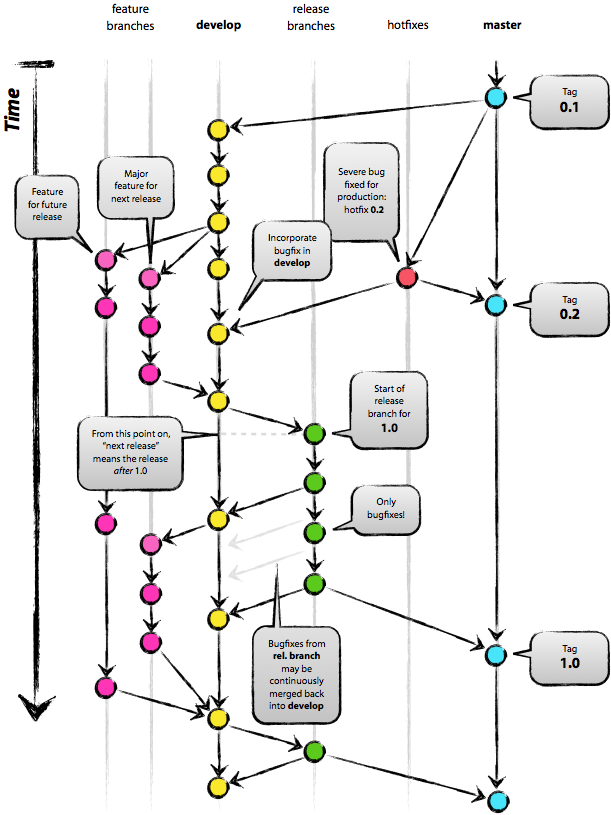
    Può sembrare complicato: ecco un grafico che spiega in forma grafica quello che ho illustrato a parole:

    Se volete saperne di più, sul sito di dell’ideatore è presente una descrizione più dettagliata di git flow.
    Bonus: su GitHub è presente un’estensione per utilizzare git-flow direttamente da git.

    Esistono anche altri modelli di workflow per git, ma a mio avviso, git-flow rimane il più indicato [per i miei progetti].

  • HTML5 e CSS avanzato: una guida per (re)-impararli

    Nonostante HTML5 sia ancora un release candidate al momento della scrittura di questo post, molte delle peculiarità del linguaggio sono supportate dai browser più evoluti (Chrome, Safari, Firefox, Opera ed IE10).

    Ho deciso di fare un ripasso delle principali istruzioni di typesetting (e di imparare anche i nuovi tag) presenti in HTML5 e delle principali proprietà presenti in CSS. Per questo ripasso mi sono affidato a due guide ben scritte da Shay Howe:

    • Guida base HTML/CSS (comprende anche HTML5 e CSS3). Non fatevi ingannare dalla presenza della parola “base”, perché i concetti esposti sono tutt’altro che base. Per esempio, grazie a questa guida ho ripassato il box-model e il posizionamento degli elementi in CSS [vi ricordate la differenza tra static, relative, absolute e fixed?]. Segnalo anche la presenza della guida ai gradienti CSS3, un’esauriente carrellata di tutte le lists [sapete usare una definition list?], i nuovi controlli per i form in HTML5, gli onnipresenti nuovi tag per audio/video ed infine le tabelle [sapete cos’è la property border-collapse?];
    • Guida avanzata HTML/CSS. Dopo aver assimilato i concetti presenti nella guida precedente, in questa guida segnalo alcuni concetti interessanti come gli sprite CSS, i selettori CSS composti (:nth-child), i preprocessori HTML e CSS (haml e SASS).

    Entrambe le guide sono ben fatte e ricche di consigli preziosi come la minification, l’abilitazione di mod_gzip e tante altre informazioni utili. Da salvare nei bookmark!